Plugin screens
Borders
Set up the ACSS corner radius scale, border width and border colors as Figma variables for corner radius and strokes.
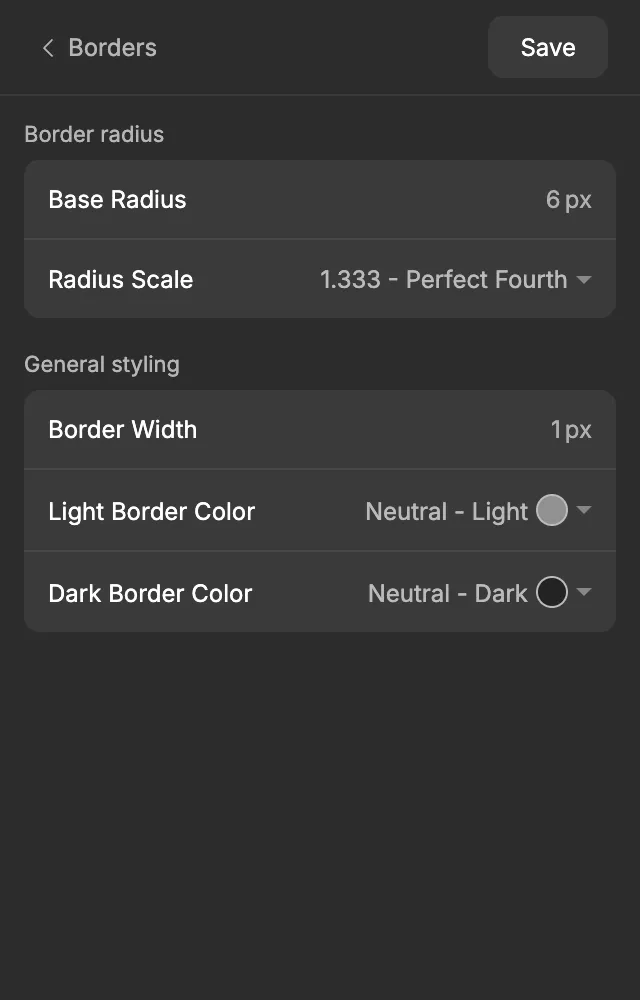
The Borders screen of the ACSS plugin for Figma turns one base radius and a ratio into a scale of corner radii, from Radius XS to Radius XXL. It also sets your default border width and two border colors, one for light backgrounds and one for dark ones. Use these variables for corner radius and strokes, and rounded corners and borders stay consistent across the design.
Before you start
Section titled “Before you start”The two border colors are picked from your palette, so set up the Color Palette first.
Settings
Section titled “Settings”Border radius
Section titled “Border radius”| Setting | Default | What it does |
|---|---|---|
| Base Radius | 6 px | Your main corner radius. It’s the value of Global Radius and Radius M. |
| Radius Scale | 1.333 - Perfect Fourth | How much the radius changes from one step to the next. A bigger ratio gives more contrast between subtle and very round corners. |
The other steps are worked out from these two numbers:
| Step | Formula | Default |
|---|---|---|
| Radius XS | Base ÷ scale² | 3.38 |
| Radius S | Base ÷ scale | 4.5 |
| Radius M | Base | 6 |
| Radius L | Base × scale | 8 |
| Radius XL | Base × scale² | 10.66 |
| Radius XXL | Base × scale³ | 14.21 |
Each step multiplies or divides by the scale once more, like the spacing scale. ACSS works out its radius sizes the same way, so the values match in WordPress.
General styling
Section titled “General styling”| Setting | Default | What it does |
|---|---|---|
| Border Width | 1 px | The default stroke width for borders. |
| Light Border Color | Neutral - Light | A light border color, for borders on dark backgrounds. |
| Dark Border Color | Neutral - Dark | A dark border color, for borders on light backgrounds. |
Pick the border colors from any shade in your palette.
When you’re done, click Save. See Saving and auto-save for what Save does.
What gets created in Figma
Section titled “What gets created in Figma”Everything goes into the Borders collection.
| Variable | Code syntax | What it’s for |
|---|---|---|
Global Radius |
var(--radius) |
The default corner radius for cards, images, inputs and other boxes. |
Radius XS … Radius XXL |
var(--radius-xs) … var(--radius-xxl) |
Smaller or larger corner radii, for example a tighter radius on a badge or a rounder one on a large card. |
Radius 50% |
var(--radius-50) |
Fully round corners, for circles (like avatars) and pill shapes. Its value is 999. |
Border Width |
var(--border-size) |
The stroke width of borders. |
Border Color Light |
var(--border-color-light) |
Borders on dark backgrounds. Points to the palette color you picked. |
Border Color Dark |
var(--border-color-dark) |
Borders on light backgrounds. Points to the palette color you picked. |
The plugin also stores your Radius Scale as a variable, Radius Scale, so you can see the setting behind the scale. It isn’t meant to be applied to layers.
Using it in your designs
Section titled “Using it in your designs”Radius variables appear in corner radius fields, Border Width in stroke width fields and the border colors in stroke color pickers.
- Select a frame or shape.
- In the right sidebar, hover over the corner radius field and click the variable icon.
- Pick a variable, for example
Global Radius.
To add a border, add a stroke to the layer. Then apply Border Width to the stroke width, and Border Color Dark (on a light background) or Border Color Light (on a dark background) to the stroke color.
In WordPress
Section titled “In WordPress”When you export to WordPress, your border settings become the ACSS border settings. The export includes the Base Radius, Radius Scale, Border Width and both border colors. The border colors are exported as links to your palette colors, so they keep following the palette in WordPress too. The export also turns on ACSS’s radius sizes, so var(--radius-xs) … var(--radius-xxl) and var(--radius-50) exist in WordPress, with the same values as in Figma.
Learn more in the ACSS border docs.
Good to know
Section titled “Good to know”- Figma has no percentage radius, so
Radius 50%uses 999 instead. A radius that large turns a square into a circle and a rectangle into a pill. In CSS,var(--radius-50)is 50 %, which turns a rectangle into an oval instead. Buttons and form inputs set to Radius 50% are exported as 999 px, so they stay pills in WordPress. - The radius values aren’t rounded, so you may see numbers like 3.38 in Figma. That’s expected.
- The border colors are linked to the Color Palette. When you change your palette and click Save, borders that use them update.
- If you rename a border variable in Figma, the next Save creates a new one with the original name, and the renamed one stops updating. Keep the plugin’s names.